OpenShift is a cloud development Platform as a Service (PaaS). It is an open-source development platform, which enables the developers to develop and deploy their applications on cloud infrastructure. It is very helpful in developing cloud-enabled services. This tutorial will help you understand OpenShift and how it can be used in the existing infrastructure. All the examples and code snippets used in this tutorial are tested and working code, which can be simply used in any OpenShift setup by changing the current defined names and variables.
- OpenShift container Platform is a platform as a service you can deploy on public, private or hybrid cloud that helps you deploy your applications with the use of Docker containers. It is built on top of Kubernetes and gives you tools like a web console and CLI to manage features like load balancing and horizontal scaling. It simplifies operations and development for cloud-native applications.
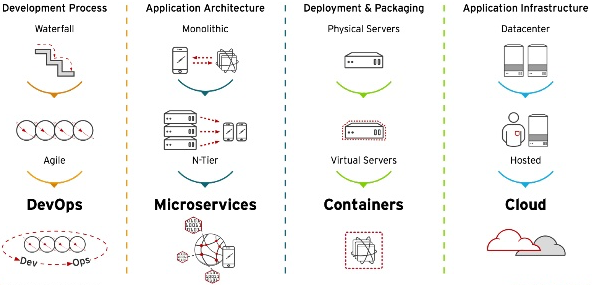
As in the above picture you can see that how much it has evolved We now have DevOps, Microservices, Containers, Cloud and Kubernetes. OpenShift combines all of those things in one platform you can easily manage. So it actually fits right on top of all of that.
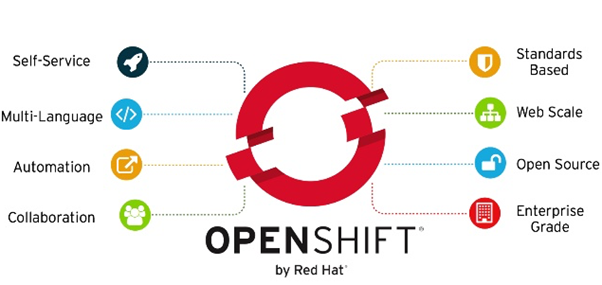
SELF-SERVICE
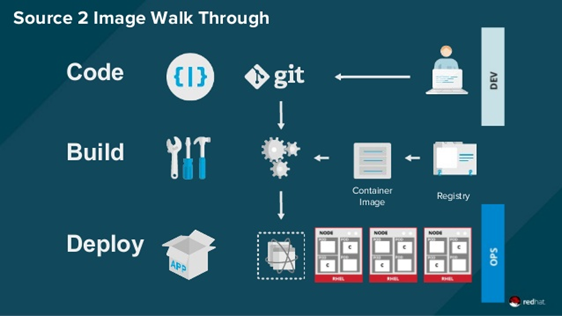
Developers can quickly and easily create applications and deploy them. With S2I (Source-to-Image), a developer can even deploy his code without needing to create a container first. Operators can leverage placement and policy to orchestrate environments that meet their best practices. It makes your development and operations work fluently together when combining them in a single platform.
MULTI-LANGUAGE
Since it deploys Docker containers, it gives you the ability to run multiple languages, frameworks and databases on the same platform. You can easily deploy microservices written in Java, Python or other languages.
AUTOMATION
Build automation: OpenShift automates the process of building new container images for all of your users. It can run standard Docker builds based on the Dockerfiles you provide and it also provides a “Source-to-Image” feature which allows you to specify the source from which to generate your images. This allows administrators to control a set of base or “builder images” and then users can layer on top of these. The build source could be a Git location, it could also be a binary like a WAR/JAR file. Users can also customize the build process and create their own S2I images.
Deployment automation: OpenShift automates the deployment of application containers. It supports rolling deployments for multi-containers apps and allows you to roll back to an older version.
Continuous integration: It provides built-in continuous integration capabilities with Jenkins and can also tie into your existing CI solutions.The OpenShift Jenkins image can also be used to run your Jenkins masters and slaves on OpenShift.
SCALE
When you want to start scaling your application, whether it’s from one replica to two or scale it to 2000 replicas, a lot of complexity is added. OpenShift leverages the power of containers and an incredibly powerful orchestration engine to make that happen. Containers make sure that applications are packed up in their own space and are independent from the OS, this makes applications incredibly portable and hyper scalable. OpenShift’s orchestration layer, Google’s Kubernetes, automates the scheduling and replication of these containers meaning that they’re highly available and able to accommodate whatever your users can throw at it. This means that your team spends less time in the weeds and keeping the lights on, and more time being innovative and productive.
OPENSOURCE
There are multiple versions of OpenShift (spoiler: it’s going to be the next topic in this blog post) but they are all based on OpenShift Origin. Origin provides an open source application container platform. All source code for the Origin project is available under the Apache License (Version 2.0) on GitHub
· BENEFITS FOR DEVELOPERS
- Code: If you’re a developer I assume you know how to code and push it to Git, so nothing new here…
- Build: The developer can push code to be built and run on OpenShift through their software version control solution or OpenShift can be integrated with a developer’s own automated build and continuous integration/continuous deployment system. Here is were S2I can get useful.
- Deploy: OpenShift orchestrates where application containers will run and manages the application to ensure it’s available for end users.
- Manage: With your app running in the cloud you can monitor, debug, and tune on the fly. Scale your application automatically or allocate capacity ahead of time .
- Source-to-Image (S2I)
It is a toolkit and workflow that creates a deployable Docker image based on your source code and add it to the image registry. You don’t even need a Docker file anymore. It combines source code with a corresponding builder image from the integrated Docker registry.