Hyper-V 2012 R2 is Microsoft’s virtualization platform, or ‘hypervisor’, which enables administrators to make better use of their hardware by virtualizing multiple operating systems to run off the same physical server simultaneously.
With Hyper-V, you can virtualize server operating systems in the data center or Windows phone environments on your desktop and most everything in between. It is also a great tool for developers that want a safe sandbox to test software.
Before you dig in deeper – Here’s a quick overview of the other main topics within this section that will help you get to grips with the basics of Hyper-V.
- BENEFITS OF VIRTUALIZATION AND HIGHLIGHT THE PARTICULAR FEATURES THAT ARE FOUND IN WINDOWS SERVER WITH HYPER-V OR WITH HYPER-V SERVER.
1. Stretching Your Hardware Dollar Further
Hardware continues to accelerate in almost every performance metric. Each year, new CPUs can process more data in the same amount of time, memory chips can hold more data for the same amount of money, and hard drive densities increase. On the other side, the demands of the most common software applications have not increased at the same pace. Hyper-V allows you to make much better use of the hardware that you’ve purchased by consolidating more computing jobs on less hardware without fear of compatibility issues.
2. Reduced Energy Demands
With the increasing popularity of “green” initiatives to reduce energy consumption, consolidation of systems onto fewer physical systems translates directly into a lower energy footprint, both in direct power and in auxiliary power, such as lighting and cooling. A smaller ecological footprint also means a smaller utility bill.
3. Enhanced Portability for Server Applications
Hyper-V also provides a great deal of portability to your server-based applications. They can be easily moved to new hardware with little or no downtime. Workloads can be rebalanced if hardware becomes overloaded, or they can be quickly recovered on another system if hardware fails. The VHDX file format that Hyper-V uses to hold virtual machine data can be mounted by any current Windows operating system so you can recover data quickly and easily.
4. Rapid Deployment of Server Environments
With a physical infrastructure already in place, new operating system environments can be deployed from templates in a few minutes, drastically reducing the time necessary to provision and deploy a new Windows Server or Linux installation.
5. Built-In Lab Environments
With the rapid provisioning and isolation features that are natural to Hyper-V, you can quickly design and deploy test and sandbox environments quickly. Disposing of them once testing has completed is even quicker.
HOW DOES HYPER-V WORK?
We’ll begin with the familiar computer. You start with the hardware. This is made of the motherboard and the CPU and the memory and the hard drive and the monitor. An operating system is the first layer of software that gets installed.
Its primary job is to corral all that hardware, ensuring that all the bits get where they need to go. Part of its function is accepting input from devices such as the keyboard and mouse. A related job is directing output to the screen, printers, and other devices.
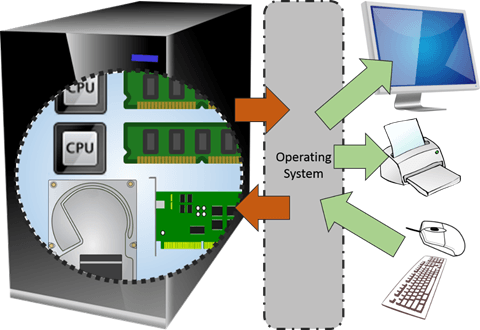
virtualization is occurring in the above diagram. “Virtualization” is really just another word for “abstraction”. Abstraction is one of the basic functions of an operating system. You haven’t got the time to learn how to send binary commands and data to the CPU in order to make your printer produce a report. So, the operating system presents to you an abstraction of the printer that you can send print jobs to.
The print job that you built was created inside another program that provided an abstraction of the document. The icons and the mouse cursor are abstractions.
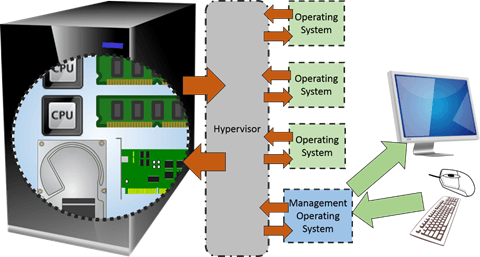
A hypervisor takes this abstraction up one more level. This is reflected in the origin of the word. In earlier times, what we now call “operating systems” used to be called “supervisors”. In common Western vernacular, the prefix “hyper-” has come to mean “above super-“. So, the term “hypervisor” was coined to indicate a supervisor of supervisors. Conceptually, the diagram below shows how it looks like-
HYPER V FEATURES:-
- High-performance virtualization layer: Virtualization necessarily adds some overhead to all guest activities. Hyper-V has been highly tuned so that virtualized operating systems and their applications suffer almost no performance impact when compared to non-virtualized equivalents
- Support for up to 1,024 virtual machines running on a single host
- Even balancing of resources across guests
- Clustering of physical hosts to provide automatic high availability protections to guests
- Dynamic assignment of resources to virtual machines
- Ability to move virtual machines between Hyper-V hosts without any downtime experienced by the guests operating systems, even if they aren’t in the same cluster
- Export of running virtual machines